

Thank's to this couple.
Thank you for your payment of January 26, 2008. We appreciated to handle your order and hope that you'll call on us again when we can be of further service.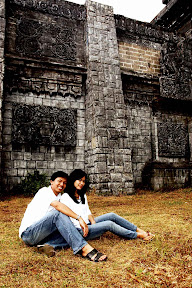
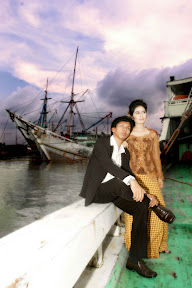
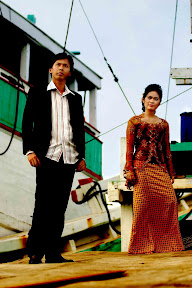
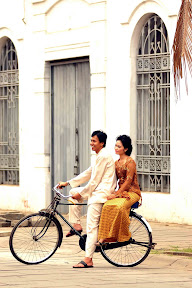
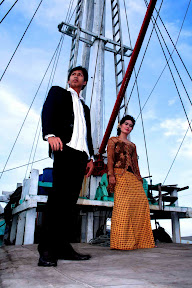
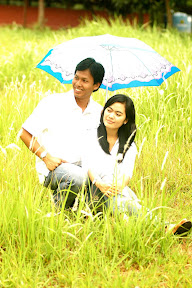
Property of Fresh Art Community !
Sunday, January 27, 2008
Prewedding Photo
Wedding Videography Tips
1.If at all possible visit the location beforehand to assess the layout, lighting, powerpoints for recharging and to be nice to the priest/officials..
2.Check out the parking access to enable a quick getaway from house to church to reception. See 7) below.
3.Have a checklist for the Big Day, so you don't forget a single thing. Don't use new untried kit on the day.
4.When shooting, shoot lots. Remember, this day will never come again. Much easier to edit down your master tapes than to lengthen them.
5.Dance on your toes. Stay very alert. Concentrate on keeping the camera still (unless you're adept at tracking).
6.Get big powerful closeups. Shoot people, all the people. A bit of the location, but go back and shoot more people. Remember we're all here because people like looking at people.
7.Check over your kit very carefully. Check whitebalance, exposure, focus settings are all as you require, and are happy with.
8.Check with the bride if she's asked you to do this film. Ask exactly what she'd like you to record. I had one bride who insisted that I never let the camera stop even for a second. They called me one-shot tom for months afterwards.
9.Try to be in two places at once. (see 4 above). Wear unobtrusive clothing, take a brave pill and move amongst the guests, filming and smiling graciously.
Decline alcohol (difficult one this) as drinking time is lost filming time. You can't do 2 things well, so concentrate on getting the footage. Don't be tempted to shoot stills; it requires a different mind set.
10.Edit ruthlessly, you hear me? Keep the original masters for sure, but if possible get the happy couple to see your edited masterpiece before they see the long version.
Remember your video camera is a sound recorder that just happens to record pictures at the same time. If you stop recording mid sentence the conversation will be nonsense wheras the pictures may be fine.
Digital Photography Tips
Digital photography is the number one choice among photographers today. A few major advantages of digital photography are:..
The elimination of paper, you only print what you like.
Immediate results, you can see your shot instantly.
Computer touch ups and manipulation.
The process is so simply with a little practice any amateur will be able to do an excellent job. You simply take your photos and import your digital images to your computer or laptop. Now you can use the digital files to only print the digital photos you want instead of wasting an entire roll of film to get one or two great shots.
Next you can save them to your hard drive, or burn them to a CD. A growing number of amateurs and professionals are also uploading them to online storage vaults for safekeeping. After you are done with the last batch of digital photos on your camera you can delete them from your camera's media card and start all over again.
To learn more about which types of cameras are available to suit your needs, you can conduct an online search. Begin at comparison sites like My Simon at www.mysimon.com and Digital Photography Review at www.dpreview.com/reviews/compare.asp
Just identify what type of camera you might like and let the review sites shop for you. They will show you comparisons in seconds. Then look at the pros and cons, figure out what fits into your budget and check the model a little further on your own.
Here are some research tips to get you started. To get going fire up your favorite search engine and key in the model number of the cameras that interest you. You will find manufactures websites and review sites with helpful information on the different makes and models. Beware, some reviews are done just to attract affiliate sales through their links, so the article writer may not have actually purchased and tested the camera they are reviewing.
Also check out new and used digital photography equipment at Amazon.com for more details and to look at all the accessories that are available. Before buying used items always check the feedback ratings for the seller and make sure you ask all your questions before you buy.
You can also add a trip to Ebay to your research. It's the world’s largest online auction site for great buys. You may find some package deals these wills include flash cards and other accessories. Remember to check feedback and ask questions before you buy.
One other over looked place to go for a deal is www.Froogle.com. Simply key in camera products by brand name, store, price, model number, etc. for more information.
Here are some popular accessories to be on the look out for while you are doing your research.
Camera bag
Flash cards, buy the largest capacity you can afford.
Batteries, buy extras
Recharging unit
Adapters
Cleaning kit
Photography is the largest hobby in the world and now it's easier than ever when you go digital. My wish for you is to have many wonderful digital photography moments.
Tuesday, January 22, 2008
Beginning in Videography
If you're looking to get into videography and video editing as a hobby, the options can be daunting. Here is a small question and response that may help you get started in this fun and rewarding hobby...
What type of camera do you recommend? Response: For a beginner, a Canon single CCD camera will suit you well. It has a cost range of $500 to $700. Canon is well respected at all levels of video camera quality and has probably the best quality for the price at the low end. If you want to start out with something more professional, you may want to look into the Canon GL2 which is a low end 3 CCD (1/4" each) camera running about $1500. This camera is great for an enthusiastic hobbyist or a beginning special events videographer. If you're looking to make some money on the side (or as a career) with your camera doing special events such as wedding videography, you may want to look into the Sony VX2100, a high-end consumer 3 CCD (1/3" each) camcorder, running at a price between $2100 and $3000, check out prices here. The high definition capable version of the same camera is called the Sony HDR / Fx1 and goes for $3700 at all major retailers. What is CCD? CCDs are imaging chips. CCD stands for charge-coupled device and is a light sensative circuit which stores an electrical charge representing each tiny part of an image. The difference between low and high end video cameras is usually determined by the number of CCDs (one or three), and the size of the CCD. In video cameras the number of CCDs determines the clarity of the picture in low lighting (most indoor) situations. The size of the CCD is directly linked to the amount of "color bleeding" present in the video. It is also interesting to note that for video cameras, unlike photography cameras, the size of the pixels is far more important than the number of pixels. Fewer pixels that are larger make a better video camera. It is also interesting to note that as you go from low-end to high-end cameras, you will be getting fewer "extras" on your camera such as the ability to take "still photography". Next question: What video editing software would you recommend? Response: Pinnacle Studio 9 has many great features for beginning in photoediting. It runs between $70 and $90 at major retail stores. It gives many options and is very user friendly. If you're looking for some more advanced options in lighting, transitions, and sound editing, you may want to consider the more professional editing software Pinacle Liquid Editions for around $600.
Editing and Organize Your Photos
The tremendous increase of using Digital Photography in the past few years gave birth to a growing need for good, easy to use and free picture editing and organization software...
There are not too many good and satisfying softwares for ordinary people like you and me that just want to download photos from our new digital camera which were taken on our last vacation. We don't need the complicated and deadly frustrating features that require half a year course to understand. Most of the softwares on the market today have been tailored for the use of photography professionals, graphic designer artists and image processing technicians. These softwares are very very expensive and hard to use.
All we need is an easy way to organize, edit and share our pictures. This is when Google decided to develop software just for our needs. And so they came up with 'Picasa'.
Picasa is surprisingly intuitive and easy to use, has very comfortable interface and relaxing graphics. The moment you enter Picasa, it automatically locates all your pictures, you will be surprised of how many pictures Picasa found that you didn't even know they exist. You can edit, share, organize in albums and print your pictures. Let's find out about the new features Picasa presents:
-Editing: Optimize your digital pictures with Picasa: remove red-eyes, improve color saturation, sharpening and much more with just few simple clicks.
-Organize: With Picasa you can instantly locate and organize all pictures on your PC and create your own photo albums
-Share: Send your photos to your Friends and Family right from Picasa.
-Publish your pictures on your blog and creating your own picture website was never easier like with Picasa.
-Creating beautiful slide shows is simple and intuitive
Print your favorite photos at home or order professional high quality Photo books , collages or movies directly from Picasa.
In addition to the main features above Picasa also gives you the possibility to burn Gift CD´s with Pictures inside to add label for every picture and it is able to perform a Ranking within all available images in order to choose the best ones.
As you can see Picasa offer great variety of options and features while keeping it simple as possible for the common amateur photographer like me.
With the free distribution of this excellent software product, Google has set a heavy milestone in the fast growing Digital Imaging business. No doubt that Picasa is the best choice now days:
You can visit Picasa Download center at http://www.picasa-officiale.com and Download the software for free.
Best regards and fun photo organizing.
Techniques In Photography
Like all fields, photography, professional photography at that, is not as easy as one may think. In fact, it is actually quite hard to produce photographs that will grab one’s attention in an instant. Here are some tips that can get you started...
Simplicity
In composing photos, one must remember that the fewer objects there are, the better. Simplicity is good in photographs as there should be few distractions from the main subject. Cluttering the photo with so many elements will only For instance, it is not good to take photos of a crowd without a main focal point for instance a building, a colorful object or an image that you can focus your into.
It is necessary to find a point of interest and then do your best to highlight it or emphasize it by using the other techniques that will be mentioned later in the article.
To practice on your composition, you should study advertising photos in newspapers. You should also scan magazines for photos or visit photo exhibits.
Contrast
Another technique that one must learn is contrast, as this makes for a great and interesting photo. For instance, a colorful subject will shine more when placed in a dark background. The same goes with for instance an African American with dark skin set against a backdrop of colorful textiles. Another example is pairing up a small and a large object. By using contrast, you are not only highlighting one but two focal points, which will draw the eye into the photo.
Balance
Generally, imbalance or any asymmetric element in the photo will be able to make the articles more interesting. This means that placing the subject off center is vastly more preferable than putting it on the center. This is actually contrary to what most people think that subjects should be in dead center.
Framing
Another technique in photography is the framing. This is when you use an element in your composition to stand as a frame for the main subject. For instance, a branch of a tree serving as a frame to a couple of lovers sitting underneath it is better than just a shot of tree with the lovers under it. This will emphasize the subject better. One thing that photographers must remember though with framing is that the subject must be the sharper element. Focusing on the frame rather than the subject will only distract the eye from your focal point.
Monday, January 21, 2008
Client 3
Thank you very much to trust Fresh Art Community to re-editing your photo. Your Pre Wedding photo will be save with us, and it will become our property.
Thank's to this couple:
Harry Juniarto & Wulan Sridamayanti
- Before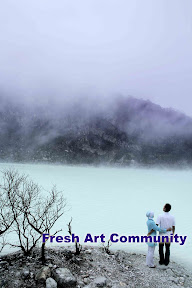
- After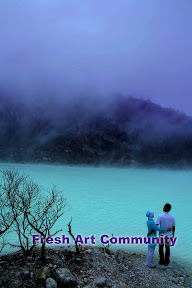
Fresh Art Community have already send you the re-editing photo to your email, please check your email.
If any question or sugestion, please contact me.
Email:
- untaya@gmail.com
- fresh_art_community@yahoo.com
Tuesday, January 15, 2008
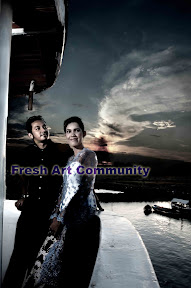
Client 2
Thank you very much to trust Fresh Art Community to re-editing your photo. Your Pre Wedding photo will be save with us, and it will become our property.
Thank's to this couple:
Hendryan Nugraha ( Eeng ) & Dwi Wulansari ( DWS )
- Before
 |
| From Fresh Art Com... |
- After
 |
| From Fresh Art Com... |
Fresh Art Community have already send you the re-editing photo to your email, please check your email.
If any question or sugestion, please contact me.
Email:
- untaya@gmail.com
- fresh_art_community@yahoo.com Read More..
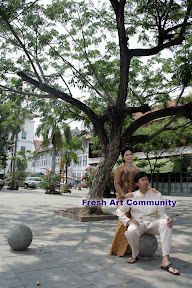
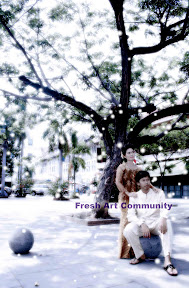
Client 1
Thank you very much to trust Fresh Art Community to re-editing your photo. Your Pre Wedding photo will be save with us, and it will become our property.
Thank's to this couple:
Abdul Rahman ( Harly ) & Yuli ( Uli )
Thank's to this couple:
Abdul Rahman ( Harly ) & Yuli ( Uli )
- Before
 |
| From Fresh Art Com... |
- After
 |
| From Fresh Art Com... |
Fresh Art Community have already send you the re-editing photo to your email, please check your email.
If any question or sugestion, please contact me.
Email:
- untaya@gmail.com
- fresh_art_community@yahoo.com Read More..
Information
Send me your photo, and leave the rest to us.
1. We will re-editing all your photo's for free ( Max. 2 photo ) and we will send your photo to your email in 1 week.
2. If you haven't receive your re-edited photo after 2 weeks, please contact me at (fresh_art_community@yahoo.com or untaya@gmail.com)
3. All photo will become our property, and it will be use for commercial purpose as a Fresh Art Community Portfolio.
4. If your not satisfied with our work, please send me back the same photo and we will re-edit it again.
5. Fresh Art Community to make available of Professional Program. For further Information, please send me email to (fresh_art_community@yahoo.com or untaya@gmail.com)
and we will explain it to you.
Subscribe to:
Posts (Atom)

